.png)
GG
By
Published Oct 25, 2020

No headings found
Why Trust Gadgetbyte?
At Gadgetbyte, we invest substantial hours into rigorously testing each product or service we review, guaranteeing that you make informed purchases. Learn more about our testing process.
Review Overview
The MSI GP65 Leopard is hands down one of the best performing laptops in this price range. However, the makers have compromised hugely in the battery life and to some extent the design as well.
Design and Build
7/10
Performance
9/10
Display
8/10
Gaming Performance
9/10
Keyboard
9/10
Trackpad
8/10
Battery
6/10
Value for Money
9/10
MSI GP65 Leopard Specifications:
- Processor: Intel Core i7-10875H
- Display: 15.6″ LED-Backlit FHD (1920×1080) 144Hz IPS-level Panel
- GPU: Nvidia GeForce RTX 2070, with 8GB GDDR5 VRAM
- RAM: 16GB DDR4 2666MHz
- Storage: 512GB SSD, 1TB 7200rpm HDD
- Ports: 1 x USB 3.2 Type-C, 3 x USB 3.2 Type-A, 1 x HDMI 2.0, 1 x mini DisplayPort 1.2, 1 x 3.5mm headphone jack, 1x RJ45, 1x SD Card Reader
- Connectivity: Integrated 802.11 ax Wi-Fi 6 + Bluetooth 5.1
- Keyboard: SteelSeries Keyboard; Per-Key RGB Lighting
- Battery: 51 WH Lithium-Polymer Battery
- Price: Rs 255,000 (i7-10750H)
Design & Build
No gallery images available
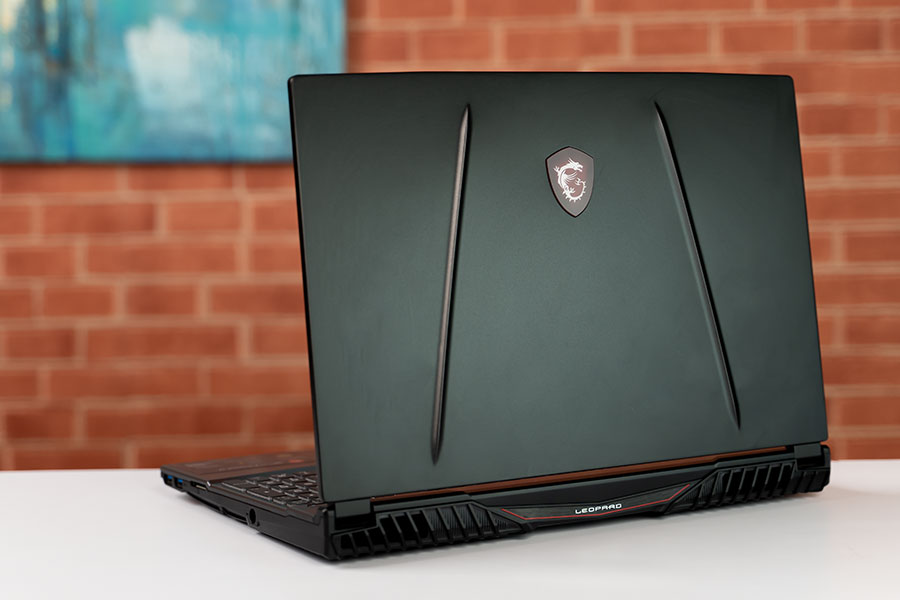
On the left, you get 2 x USB 3.2 Gen 1 Type-A port, SD card reader, and power input. I always prefer fewer wires on the left-hand side, and this laptop provides me just that. Underneath, there are air intake vents right above the intake fans.
Now, the inside in contrast to the lid is made up of plastic rather than metal. Seems cheap but trust me the build quality is great. And the fingerprints don’t show up in on the silver finish. Neither the keyboard nor the palm rest flexed when applied pressure. However, the lid, despite being a metal build has got quite a flex to it. But it’s not that much of a concern. So, you probably won’t have to worry about it too much.
Keyboard and Trackpad


MSI Dragon Center
The laptop ships in with the MSI Dragon Center, from which you can control your system. You swap between the user profiles, customize fan speed, battery master, and so on. The battery master feature is pretty handy. It helps you customize the charging options based upon your habits to prolong the battery life. Under the user profiles, you can switch between extreme performance mode, balanced mode, silent mode, super battery, and a customized user mode. Under the customized mode, you can set the performance to Turbo, high medium, and low. Similarly, the fan speeds can be manually adjusted or set to either Auto, Advance, or Cooler Boost. You can toggle between them from this same app depending upon the task you are doing. So, great features and all in the Dragon Center, but the app itself is quite buggy. First off, I had to install the app twice just to get it started, and even then, some of the features kept disappearing occasionally. For instance, it only shows the system info and ambient link and nothing else. You’ll have to restart the system to get it working properly. Also, it’s quite astonishing that the control center does not give you the option to customize the keyboard lightings. So, my user experience with the in-house Dragon Center app was not that great.Display

Hardware and Performance
Let’s move on to performance and hardware. My review unit packs in the 10th Gen Intel i7-10875H CPU. It is based on the comet lake architecture and clocks between 2.3-5.1GHz. This 45W CPU delivers almost 15% improvement over the 9th Gen that was used in last year’s model. It is thankfully it coupled with the Nvidia RTX 2070 GPU. I really liked that it has the standard one and not the under-powered Max-Q version. Generally, laptops in this segment go for the latter and it does affect the performance of the device to some extent. This standard RTX 2070 very efficient and will help you achieve high fps in most of the games. More on this a bit later. Other hardware specs include 16GB DDR4-266MHz dual-channel RAM. And that’s a bit unfortunate as this is a bit slower and maybe they could have gone with the 2933MHz that the 10th Gen CPU supports. There are two RAM slots inside, meaning you can easily upgrade it to up to 64GB. Storage-wise it has a 512GB M.2 NVME SSD and 1TB HDD. You can always upgrade the internals yourself, and it's quite easy. Simply open the bottom and bam you have easy access to the internals. Under the hood, you’ll be able to see the heat pipes, the chunky 6-Cell 51Whr battery. While we are on the topic of battery, let me just say that this aspect of the device is quite underwhelming.Gaming & Regular Tasks
Talking about games, it’s simply a joy to play in this rig. AAA titles easily hit high fps on medium to low settings and even in high settings, the games have minimal lags. That means, for less demanding games, the laptop works like a breeze. On Battlefield V, I managed around 108-110 fps on ultra-settings. Now, comparing that with the Triton 500’s, there’s not much difference here. However, the GP65 Leopard holds its own even with Ray Tracing on. With DXR on and in ultra-settings, I managed around 65fps. And on Triton 500, it was around the lower 50’s. So, there’s a big difference here. Stats of other games are somewhat similar with the GP65 pipping the Triton by a few margins. However, if you still want some extra fps on games, you can do so by upgrading the system to DDR4-2933 memory.FPS stat in various games
| High/Ultra | Medium | Low | |
| CS:Go | 228 | 256 | 285 |
| Warframe | 130 | 140 | 145 |
| Paladins | 166 | 172 | 175 |
| Wither 3: Wild Hunt | 80 | 110 | 134 |
| Valorant | 275 | 282 | 289 |
| Sekiro: Shadows Die Twice |
60 (in all settings)  | ||
| Battlefield 5 (DXR off) | 106 | 135 | 144 |
| Battlefield 5 (DXR on) | 63 | 86 | 94 |
| Apex Legends | 138 | 140 | 144 |
Battery & Speaker
In balanced mode, I got about one hour and ten minutes while doing normal stuff such as web browsing and so. Switch to the extreme performance mode and the battery backup time decreases. You can opt to tweak around the user profiles a bit, but it really does not help that much. Underneath the hood, you’ll also find the two 2W speakers. Now, MSI advertises it as “Giant Speakers”, but all I can say is that the simply decent. A bit louder than other gaming laptops but lacks bass. You can customize the audio options from the Nahimic audio software. So, nothing spectacular. Furthermore, the fan noise will easily drown the speaker. And thus, you’ll need a good pair of headphones while playing games.Thermals
Heating, for the most part, is not an issue either. The fan noise will bug you a lot though. I played the games in extreme mode with a cooler boost on for the best result. And it handled the thermals pretty well. After a while though, the area above the keyboard deck and the central part of the keyboard do heat up. However, the WASD keys are relatively cooler. Warm but not exactly uncomfortable. And the palm rest remains cool too. On longer gaming sessions, the heating of WASD keys might become an issue though.Verdict
Perfect for both gaming and daily use. That pretty much sums up the GP65 Leopard. With 10th Gen Intel Core i7 processor and RTX 2070 graphics, this laptop can handle anything you throw at it with ease. However, having said that, the battery life is not up to par, and the speakers are just above average. Some may even feel that the design of this laptop is a bit outdated. Furthermore, this laptop will be a difficult one to carry around. Issues aside, this is one of the best performing laptops in this price segment. If you are looking for a performance master, then this one would be a good choice. But, if portability is what you are after, then you’ll probably want to look elsewhere.Article Last updated: October 25, 2020